
Download Genesy AI – AI‑Powered Sales Automation Tool
Introduction
In today’s hyper‑competitive B2B landscape, sales teams are forced to juggle countless tasks: prospect research, data enrichment, outreach sequencing, and constant follow‑up. Genesy AI was built to lift that burden by marrying real‑time data aggregation with cutting‑edge artificial intelligence, delivering a single‑pane‑of‑glass platform that automates the most time‑consuming parts of the sales cycle. Whether you are a lean startup with two reps or an enterprise with dozens of account executives, the tool promises to cut prospecting effort by up to 60 % while boosting reply rates through hyper‑personalized messaging.
Delivered as a secure, cloud‑native SaaS solution, Genesy AI eliminates the need for on‑premise servers, manual patching, or complex IT overhead. In this review we will explore the core capabilities, walk through the onboarding process, examine system compatibility, and weigh the pros and cons to help you decide if Genesy AI is the right addition to your sales tech stack. By the end, you’ll have a clear picture of how the platform works, what you can expect during implementation, and why many forward‑thinking sales leaders are already adopting it to accelerate revenue growth.
Overview & Core Features
Genesy AI is a cloud‑based B2B sales platform that combines massive data pulls from public directories, social networks, and proprietary sources with sophisticated machine‑learning models. The AI engine evaluates each prospect on firmographic, technographic, and intent signals, then scores leads for relevance and buying readiness. Once qualified, the system automatically drafts outreach emails and LinkedIn InMails that mirror the prospect’s industry jargon, recent activities, and pain points.
All communications are orchestrated through multi‑channel sequences that include email, LinkedIn, SMS, and even WhatsApp, allowing sales reps to maintain a consistent cadence without manual effort. Integrated dashboards provide real‑time analytics on open rates, click‑throughs, and response trends, while AI recommendations continuously refine messaging based on performance data. The platform’s modular architecture lets teams activate only the features they need, keeping the user experience lean and cost‑effective.
- AI‑Driven Lead Scoring: Real‑time machine‑learning models rank prospects using firmographics, technographics, and intent data.
- Hyper‑Personalized Message Generator: Dynamic templates create email and LinkedIn messages that adapt to each prospect’s recent activity.
- Multi‑Channel Sequencing: Automated outreach across email, LinkedIn, SMS, and WhatsApp with real‑time engagement tracking.
- Bi‑Directional CRM Sync: Native connectors for Salesforce, HubSpot, Zoho, and Microsoft Dynamics keep data consistent.
- Geolocation Enrichment: Google Maps integration adds location insights, route planning, and regional market data.
- Drag‑and‑Drop Playbooks: Visual workflow builder for custom sales cadences without any coding.
- Enterprise‑Grade Security: End‑to‑end TLS encryption, GDPR compliance, role‑based access, and audit logs.
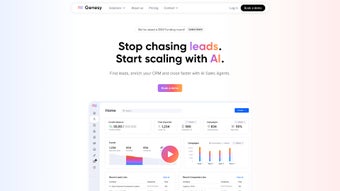
- Real‑Time Analytics Dashboard: KPI widgets for pipeline health, outreach performance, and AI recommendation impact.
- Scalable Cloud Architecture: Auto‑scaling infrastructure handles spikes in lead volume without latency.
- Integration Marketplace: Over 30 third‑party apps, including Slack, Teams, Calendly, and Zapier, extend functionality.
Installation, Usage & Compatibility
Genesy AI is delivered as a pure SaaS application, which means there is no client‑side installation or hardware to provision. The onboarding process is designed to get new users up and running in under an hour, while still offering deep customization for more complex deployments.
- Create Your Account: Visit the official Genesy AI site, click “Start Free Trial,” and register with a corporate email. Verify the account via the confirmation link sent to your inbox.
- Secure Single Sign‑On (SSO): If your organization uses Azure AD, Okta, or OneLogin, enable SSO from the Settings → Authentication page. This step streamlines user provisioning and aligns with corporate security policies.
- Connect Your CRM: Navigate to Integrations, select your CRM (e.g., Salesforce), and follow the OAuth flow to grant read/write permissions. This bi‑directional sync ensures leads created in Genesy AI appear in your CRM and vice versa.
- Import Existing Leads: Use the Data Sources tab to upload CSV files or point the system to an API endpoint. Genesy AI will automatically enrich each record with firmographic and technographic data, then apply AI scoring.
- Configure Playbooks: Choose a pre‑built playbook or build a custom workflow with the drag‑and‑drop editor. Define trigger events (such as “new lead added”), set messaging templates, and schedule follow‑up intervals.
- Set Outreach Channels: Link corporate email, LinkedIn Sales Navigator, and optional SMS gateways. Verify each channel’s authentication to prevent deliverability issues.
- Run a Pilot Campaign: Select a small segment of leads, launch the AI‑generated sequence, and monitor real‑time analytics for open, click, and reply metrics.
- Scale & Optimize: Once the pilot proves successful, expand to larger audiences. Leverage the dashboard’s AI suggestions to tweak messaging, adjust cadence timing, or re‑score leads for higher conversion probability.
Genesy AI runs in any modern web browser, making it compatible with Windows 10/11, macOS 12 Monterey or later, Linux distributions, Chrome OS, Android 9 and up, as well as iOS 14 and newer. Minimum requirements are a current version of Chrome, Edge, Firefox, or Safari with JavaScript enabled and a broadband connection of at least 5 Mbps for smooth real‑time data streaming. For enterprises with strict network policies, the service supports VPN tunneling, IP whitelisting, and TLS 1.2+ encryption. Single Sign‑On integrations with Azure AD, Okta, and OneLogin further simplify user management and compliance.
Pros, Cons, Frequently Asked Questions & Conclusion
Pros
- AI‑generated, hyper‑personalized outreach dramatically reduces manual copywriting effort.
- Deep bi‑directional CRM integrations keep data consistent and eliminate duplicate entry.
- Multi‑channel automation (email, LinkedIn, SMS, WhatsApp) increases touchpoint frequency without extra workload.
- Real‑time analytics and AI recommendations provide actionable insights for continuous improvement.
- Scalable cloud infrastructure handles large lead volumes without performance degradation.
- Enterprise‑grade security, GDPR compliance, and role‑based access protect sensitive prospect data.
- Drag‑and‑drop playbook builder enables non‑technical users to design custom sales cadences.
Cons
- Initial AI model training requires a reasonable amount of historical lead data for optimal accuracy.
- Pricing tiers can be steep for very small teams that need only basic prospecting features.
- Advanced workflow customization may present a learning curve for users without technical backgrounds.
- Reliance on third‑party APIs (LinkedIn, email providers) can lead to occasional rate‑limit restrictions.
- All core functionalities depend on an internet connection; offline usage is not supported.
Frequently Asked Questions
Is Genesy AI suitable for startups with a small sales team?
Absolutely. The Starter plan provides essential AI prospecting, email automation, and basic CRM sync at a price point that fits teams of 2‑10 reps. Because the platform is modular, startups can enable only the features they need, keeping costs predictable while still benefiting from AI‑driven efficiency.
How does Genesy AI ensure data privacy and compliance?
Genesy AI uses end‑to‑end TLS 1.2+ encryption, stores data in GDPR‑compliant data centers, and offers role‑based access controls. Customers can define data retention policies, and the platform provides Data Processing Agreements for enterprise users. All enrichment sources are vetted for privacy compliance.
Can I integrate Genesy AI with my existing marketing automation tools?
Yes. The Integration Marketplace includes connectors for HubSpot, Marketo, Pardot, and Zapier, allowing you to trigger marketing campaigns based on AI‑identified intent signals or sales‑stage changes. Bi‑directional sync keeps contact attributes consistent across platforms.
What support is available during onboarding?
Every new customer receives a dedicated Customer Success Manager who assists with account setup, CRM integration, and playbook configuration. Genesy AI also offers a comprehensive knowledge base, video tutorials, and 24/7 live chat. Enterprise contracts include optional on‑site training sessions.
How is pricing structured for Genesy AI?
Genesy AI follows a subscription model with three primary tiers: Starter (up to 5 users), Professional (5‑20 users), and Enterprise (20+ users). Each tier includes a set number of AI‑generated leads per month, with the ability to purchase additional lead credits. Prices are quoted in USD per user per month, and annual billing receives a 15 % discount.
Conclusion & Call to Action
Genesy AI distinguishes itself in the crowded sales‑automation market by delivering a truly AI‑centric experience that not only finds the right prospects but also crafts outreach that feels genuinely personal. The platform’s seamless CRM integrations, multi‑channel sequencing, and real‑time analytics provide a holistic view of the sales pipeline, while its cloud‑first architecture guarantees scalability and low maintenance overhead. Although the learning curve for advanced playbooks and the premium pricing for larger teams merit careful consideration, most organizations see a measurable ROI within the first quarter of use. If you’re ready to replace manual prospecting with intelligent automation and accelerate revenue growth, now is the perfect time to give Genesy AI a try. Start your free trial today and experience AI‑powered sales efficiency firsthand.
Pros: AI personalization, deep CRM sync, multi‑channel automation, robust analytics.
Cons: Higher cost for large teams, initial data training needed.



.png)



